Imagine you have a method which returns a Json String of following format.
{Name:'Anu Viswan',Languages:'CSharp'}
In order to deserialize the JSON, you could define a class as the following.
public class Student
{
public string Name{get;set;}
public string Languages{get;set;}
}
This work flawlessly. But imagine a situation when your method could return either a single Language as seen the example above, but it could additionally return a json which has multiple languages. Consider the following json
{Name:'Anu Viswan',Languages:['CSharp','Python']}
This might break your deserialization using the Student class. If you want to continue using Student Class with both scenarios, then you could make use of a Custom Convertor which would string to a collection. For example, consider the following Converter.
class SingleOrArrayConverter<T> : JsonConverter
{
public override bool CanConvert(Type objectType)
{
return (objectType == typeof(List<T>));
}

public override object ReadJson(JsonReader reader, Type objectType, object existingValue, JsonSerializer serializer)
{
JToken token = JToken.Load(reader);
if (token.Type == JTokenType.Array)
{
return token.ToObject<List<T>>();
}
return new List<T> { token.ToObject<T>() };
}

public override bool CanWrite
{
get { return false; }
}

public override void WriteJson(JsonWriter writer, object value, JsonSerializer serializer)
{
throw new NotImplementedException();
}
}
Now, you could redefine your Student class as
public class Student
{
public string Name{get;set;}
[JsonConverter(typeof(SingleOrArrayConverter<string>))]
public List Languages{get;set;}
}
This would now work with both string and arrays.
Case 1 : Output
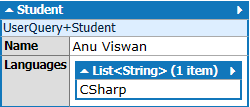
Case 2 : Output

 ByteLanguage.Net